Curriculum
Artificial intelligence, year by year, from grade 5 to grade 12
144 lessons, 18 for each year, written for the age of every grade. The titles below are the ones in the platform.
Grade 5
Lower secondary · 18 lessons- What artificial intelligence is (and what it is not) Find out what artificial intelligence means, where you come across it every day and why it does not think or feel like a human.
- How a machine learns: examples and patterns Discover how a program learns to recognise a cat from lots of example photos, what patterns are and why a machine can be fooled.
- How a program decides: rules, decision trees, search Find out how a program that follows rules written by people makes decisions, how a decision tree works and how a program searches for the best route.
- Data: the food of AI Learn what data is, where it comes from and why an AI fed on wrong or incomplete data gives wrong answers.
- Talking to a chatbot: how to ask a good question Learn what a chatbot is and how to write a good question (a prompt): clear, with context and broken down into steps.
- When AI gets it wrong: made-up answers and how to check Find out why an AI can make up answers that sound convincing, and learn a few simple steps to check what you read.
All the lessons of the year (18)
- My safety online: personal data, deepfakes and who to tell Learn which personal details you never give out, what fake images and voices made with AI are, and who to tell when something frightens or confuses you.
- AI for homework: a coach, not a crib sheet Learn the difference between using AI to learn and using it to copy, and how to turn it into an honest coach.
- Creative with AI: stories, drawings, music and respect for authors Discover how AI can help you with stories, drawings and music, why your own idea matters most and how to respect artists’ work.
- How a computer reads handwritten digits Find out how a program learns to recognise a digit written by different people, why some digits look alike and where it makes mistakes.
- A map doesn’t show everything: what we keep and what we leave out Discover that every map or diagram keeps only what is needed for a purpose, and that a computer, too, works with simplified pictures of the world like these.
- Ideas taken from nature: bats, ants and machines that copy them Find out how some animals sense the world differently from us and how people have used ideas from them: distance found with an echo, the best path found the way ants do it.
- Sentences by rules: how a computer builds sentences Build sentences with cards and rules, like a simple program, and discover that a sentence can be grammatically correct but make no sense at all.
- What every child knows and the computer doesn’t: common sense Discover how many things you know without ever learning them in a lesson (that water makes things wet, that a dropped glass can break) and why a computer lacks them.
- What will the weather be tomorrow? Predictions from past days Find out what weather stations measure, how a program can learn from past days what comes next and why a forecast is an estimate, not a promise.
- My password and my account: how I look after my account Learn why a long password is hard to guess even for a fast computer, how to choose one you can remember, who you tell it to and what to do if someone uses your account.
- Technology for everyone: AI that helps people see, hear and speak Find out how AI helps people with disabilities (captions made on the spot, phones that read aloud and describe pictures, voice commands) and why it is built together with them.
- Project: a picture book about AI for younger pupils As a team, make a hand-drawn book that explains to pupils in the lower years what AI is, what it can do, what it cannot do and one safety rule, then read it to them.
Grade 6
Lower secondary · 18 lessons- How a computer “sees”: pixels, colours and edges Find out how a picture becomes a table of numbers and how a computer finds the edges and shapes in it, the first step towards recognising an object.
- How a computer “hears”: voices, music and guessed words Discover how a sound becomes a string of numbers and how a voice assistant guesses what you said, using the words around it.
- Sensors and robots: sensing is not understanding Find out what sensors measure, what they can sense that we cannot, and why an automatic door only reacts, while a robot with AI tries to understand.
- The shortest route: maps, nodes and search Learn how a computer turns a map into a network of places and links, and how it searches, step by step, for the shortest route.
- Recommendations: how an app guesses what you like Find out how an app uses what you watched, liked or searched for to suggest what comes next, why you see more and more of the same kind, and how you choose.
- AI in nature and in sport: animals counted, balls tracked See how AI helps researchers recognise animals in photos taken automatically and referees follow the game, and what the human still decides.
All the lessons of the year (18)
- Hurry, secret, reward: the messages that want to trick you Learn three signs of a message, game or chatbot that wants to trick you, and the calm steps you take: you stop, you do not send anything, you tell an adult.
- Words with two meanings: why the chatbot misses the joke Discover why words with several meanings, expressions and jokes confuse a chatbot, and how you help it with context to understand what you want.
- Project: the map of AI in our class’s life In teams, make a poster of the AI at home, at school and in the street: what it senses, what data it uses, what it decides and what rule for good use you propose.
- The Earth seen from above: satellites, unseen colours and maps made with AI Find out how satellites photograph the Earth, also in light the eye cannot see, and how a program divides a satellite image into forest, water, fields and town, so you can see what has changed.
- Detectives of the past: the AI that helps read old documents See how AI helps historians transcribe old letters and inscriptions, with faded letters or letters written differently from today, and why the historian has the last word.
- When the computer reads aloud: from text to speech Find out how a program turns a text into speech, why it stumbles over abbreviations, numbers and words spelt the same but said differently, and who it helps.
- The robot that makes its plan: steps, order and obstacles Find out how a robot makes a plan: it starts from how things are now, knows what it wants to achieve, looks for an order of steps in which each one can be done, and changes it when an obstacle appears.
- Spam or not? How a filter learns to sort messages Find out how a program learns to put unwanted messages aside, by counting the words in messages already sorted by people, and what it does when it gets a good message wrong.
- What an assistant can and cannot do: you choose the right tool Learn to recognise the questions an AI assistant helps you with, the ones where a dictionary, a map or a person is better, and the ones nobody knows the answer to for sure.
- What I post and who sees it: the audience, copies and other people’s consent Learn who can see what you send or post, why a photo or a message can be copied and kept by others for a long time, and why you ask before you post someone else.
- For everyone or just for some? Devices that do not work the same for everybody Find out why a device with AI can work well for some people and badly for others (children’s voices, accents, quiet speech) and how you test it with different people before everyone uses it.
- Project: the class board game about AI As a team, you invent a board game with a board, cards and rules, in which the players move forward using what they have learned about AI this year, then you test it with another team.
Grade 7
Lower secondary · 18 lessons- Features: how we describe things so a computer can compare them Learn to turn real things (leaves, fruit, objects) into table rows with features, and see why the features you choose decide what a program can learn.
- The tree that learns from data See how a program builds a decision tree by itself, choosing at each step the question that best separates the examples, and how you test it on new cases.
- Learning by trial and reward Find out how a program learns to play or to move by trying, getting points and changing its choices, and why what you reward matters.
- Faces and cameras: detecting, recognising and privacy Learn the difference between finding a face in a photo and saying whose it is, how the program works with features, and what privacy questions a camera that recognises people raises.
- Noughts and crosses: how the computer chooses its move Find out how a computer represents a game as a board and moves, how it draws the tree of possible moves and why in big games it cannot try them all.
- What apps know about me: permissions, location, profile Find out what apps ask for through permissions (location, microphone, contacts), how your traces add up to a profile and how you choose what to give and what not to.
All the lessons of the year (18)
- The “empathetic” chatbot: my feelings and the people around me Find out how a program “guesses” feelings from words, voice or face, what a chatbot that seems understanding cannot do, and how to ask people for support.
- Machine translation: how a text moves from one language to another See how a translation program learns from texts already translated by people, where it goes wrong (idioms, gender, tone) and how you check a translation before you use it.
- Project: a paper classifier for recycling at school As a team, build on paper a classifier that sorts waste into paper, plastic and metal: features, examples, a tree, a test and the mistakes report.
- How many steps did you take? How a device recognises movement Find out how the motion sensor in a phone or a wristband measures every jolt, what walking, running and standing still look like as graphs, and how a program tells them apart by their features.
- More examples from the same examples: rotations, mirror images and traps Find out how programmers turn a few photos into many new examples (rotated, mirrored, shrunk, darker) so that a program learns better, and when such a change spoils the label.
- Something is not right: how a program spots unusual data Find out how a program learns what is “usual” from many measurements and raises an alarm when something different appears, and why some alarms are false and must be checked by a person.
- The school timetable: how a computer solves a problem with many rules Find out how a program searches for a timetable in which every rule is kept (a teacher cannot be in two classes at once), by trying, checking and going back when it gets stuck.
- The automatic summary: what a program keeps and what it loses Find out how a program can make a summary by choosing the sentences with the most important words, compare its summary with a person’s and see what gets lost.
- The smart farm: sensors, drones and the farmer’s decision See how soil sensors, drone images and AI programs help with watering and caring for crops, who can afford these devices and what the farmer still decides.
- Screen time: the apps that hold your attention and my plan Find out which design tricks keep people longer in apps (endless scrolling, autoplay, notifications, streaks), why sleep matters and how you make a plan of your own.
- Robots that help: in the warehouse, in hospital and at home Find out how a robot works in the “sense – decide – act” loop, where it already helps people (warehouses, hospitals, homes) and what remains irreplaceable in the care a person gives.
- Project: the paper prototype of an AI app In a team, you draw on paper the screens of an AI app for a school need (lost property, the library, recycling), test them with classmates who “tap” on the paper and improve it.
Grade 8
Lower secondary · 18 lessons- Machines that find their own way: sensors working together Find out how a self-driving car or a robot combines its camera, radar, GPS and other sensors to know where it is and what is around it, and what to do when a sensor gets it wrong.
- Concept maps: how a computer links ideas together Learn how a computer keeps knowledge as a network of concepts and relations, how it works out new things from it and how such a map can help you study.
- Words as numbers: the map of meanings Discover how a program places words on a map according to how they appear in texts, so that words close in meaning sit close together, and what can spoil such a map.
- Groups without labels: when the computer makes its own categories Find out how a program finds groups in data without being given the answer, how groups are made on paper around centres, and why a person gives them their meaning.
- Can a machine be conscious? Criteria and arguments Discuss with arguments what it would mean for a machine to be conscious, choose criteria and apply them to a chatbot and to robots from stories.
- Who gets a say? The values behind an AI system Find out that an AI system behaves according to the choices of the people who design it, that different people want different things from it, and how everyone can be taken into account.
All the lessons of the year (18)
- Jokes, edits, fake accounts: when AI is used to hurt Find out how AI edits and fake accounts can be used to humiliate someone, why they are not “just jokes” and what you do as a witness or as the target.
- Machines that change work: from steam to AI Compare the changes brought by the steam engine, by electricity and by computers with those brought by AI, to see what repeats and what is new.
- Project: AI for a problem in our community In a team, choose a real problem in your neighbourhood or school, find out whether AI would help and design the solution on paper: sensors, data, stakeholders, risks.
- Electronic ears in the forest: AI that recognises the sounds of nature Find out how researchers listen to forests with microphones left there for months, how a program recognises a bird’s song by its shape on a graph and what people still decide.
- The app that recognises plants: when you can rely on it Analyse how an app recognises a plant from a photo, why it is surer about some species than others and why the same mistake costs little with a flower and a great deal with a mushroom.
- The best route, by which criterion? Navigation and its effects Find out how a navigation app looks for the route with the lowest “cost” (time, distance, safety), how it estimates traffic from the data of many phones and what happens to a quiet street when everyone is sent down it.
- Several trees, one decision: how models vote together Find out how programmers build several decision trees, each from different examples, and make them vote, and why the vote is usually wrong less often than a single tree.
- The people behind AI: who puts on the labels and who checks Find out that much of AI relies on human work (labelling examples, checking answers), why two people do not always label the same way and under what conditions this work is done.
- The assistant that listens: the wake word, the recordings and your home Analyse how a voice assistant “waits” for the wake word, why it sometimes wakes up by mistake, what can happen to the recordings and what rules a family makes for itself.
- Money in games and apps: coins, surprise boxes and offers tailored to you Find out how some games push you to spend (coins that hide the real price, boxes with rewards by chance, offers that expire “in 5 minutes”), how programs choose the offer for you and what scams with game items exist.
- Children’s rights in the world of AI: what an app made for you should respect Find out what children’s rights organisations ask of the AI systems children use (safety, privacy, fairness, explanations they can understand) and check an imaginary app against these requirements.
- Project: the class campaign for the responsible use of AI In a team, prepare an information campaign for the school’s pupils about a safety topic or about using AI well: the audience, the message, the posters, a short sketch and how you find out whether it helped.
Grade 9
Upper secondary · 18 lessons- How a language model works You will understand what a language model is, how it predicts the next token, how it is trained and why it sounds just as sure of itself when it is right as when it is wrong.
- Neural networks, types of learning and how we measure a model You will calculate an artificial neuron on paper and find out how a network learns, what the three types of learning are and how to measure, honestly, how good a model is.
- Prompting for learning: AI as a Socratic teacher You will learn to structure a prompt with a role, context, a task and constraints, to iterate, and to use AI like a teacher who asks you questions instead of giving you the answer.
- Hallucinations and checking information You will understand why language models produce convincing false statements and learn a method for checking them: primary sources, cross-checking and lateral reading.
- Bias and fairness in AI systems You will understand where bias in AI systems comes from, how it shows up in decisions and what you can do about it as a user or as a future creator.
- Deepfakes, manipulation and disinformation You will learn what deepfakes and disinformation are, which signals help you recognise them, how to check suspicious content and how to respond responsibly.
All the lessons of the year (18)
- Your data and the law: GDPR and the AI Act made clear You will find out what personal data is, what rights GDPR gives you and what, in short, the European regulation on artificial intelligence (the AI Act) sets out to do.
- AI and the future of jobs You will analyse how AI is changing work, which skills remain valuable and how to use AI responsibly in your projects, so that you are prepared for any career.
- Project: design an AI assistant for your school You will work in a team on the design of an AI assistant for a real problem in your school: you define the problem, think through the data, ethics and safety, then test it on paper.
- How well does it hear you? Speech recognition, accents and the error rate You calculate how often a transcription system gets it wrong (words replaced, skipped, added), see why it makes more mistakes for some voices and accents, and what that means for the people who use it.
- Expert systems: rules, chains of deductions and explanations You build a small expert system from “if… then…” rules, let it reason step by step from facts to a conclusion and the other way round, and compare its explanations with those of a model learned from data.
- Characters in games: state machines and behaviour that seems intelligent You find out how many game characters are built (a diagram of states and rules for moving between them) and why something that seems intelligent can be very simple.
- Data made by AI for AI: synthetic data and its risks You analyse why data generated by programs is used instead of real data (privacy, rare cases) and what happens when new models keep learning from what earlier models produced.
- From search to answer: the index, the ranking and citing sources You find out how a search engine finds pages (the index), how it ranks them, how an assistant builds an answer from the pages found, and why a citation alone does not prove that the claim is in the source.
- Who has access to AI? Digital divides and technology for everyone You analyse, using official data, who has access to the internet, to devices and to digital skills, how AI can widen or narrow the gaps and what a school can do.
- My phone and laptop, kept safe: updates, apps, networks and QR codes You learn the habits that keep your devices safe (updates, apps from official stores, public Wi-Fi networks, QR codes and shortened links), why scam messages written with AI seem more believable and what you do, calmly, after a wrong click.
- Dilemmas for machines: who decides the values of an autonomous system You analyse how an autonomous system should decide in situations with no good solution, why people in different places answer differently and why the more useful question is how you avoid such situations through design.
- Project: a lesson about AI taught by you to lower-secondary students As a team, you prepare and teach a 20-minute lesson about one AI idea for lower-secondary students: the objective, an explanation they can understand, a paper activity and three check questions.
Grade 10
Upper secondary · 18 lessons- Computer vision: filters, features and convolutional networks You apply a filter by hand to an image made of numbers, see how it detects edges and how layers of learned filters end up recognising shapes and objects.
- How you really learn: proven techniques and where AI fits in You find out which learning techniques have the best evidence (self-testing, spaced repetition), what explaining adds and how to use AI to apply them, not to get around them.
- Predicting with a straight line: regression and the memorising trap You fit a straight line through points by hand to make predictions, then see why a model that fits the training data too closely gets new data wrong.
- Attention: how a language model takes context into account You find out how a language model represents words as lists of numbers and how attention helps it link each word to the ones that matter for it in the sentence.
- From noise to image: how image generators work You understand, in broad terms, how a generator learns to turn noise step by step into an image that matches a description, and what this means for the images you use.
- AI agents: when an assistant doesn’t just answer, but acts You find out what an AI agent is (a model that plans steps and uses tools), where it helps, what can go wrong when it acts on its own and why a person confirms the important steps.
All the lessons of the year (18)
- My health and AI: advice, body, self-image You find out why a chatbot is not a doctor or a psychologist, how filters and generated images change the way you see your body, and how to ask for real help when you need it.
- AI and the environment: energy, water and choices You analyse where the energy used by AI comes from, what data centres consume, where AI helps the environment and how you weigh the cost and benefit of a use.
- Project: build a test for a chatbot As a team, you build a set of questions with checked answers for a subject, set the assessment criteria and test a chatbot, reporting honestly what you measured.
- How far away is it? Lidar, stereo cameras and depth images You calculate how a lidar measures distance from the time light takes to come back, how two cameras work out depth from the difference between their images, and where depth images are used, from robots to archaeology.
- Where am I? How a robot reasons under uncertainty You follow on paper how a robot updates its belief about where it is: it starts out unsure, moves, sees a door and recalculates its chances for every place.
- Cameras that search for people in a crowd: false alarms and the rules You calculate how many false alarms a “highly accurate” face recognition system gives when it checks tens of thousands of people, analyse who pays for the mistakes and what European law says about such systems.
- Going down the slope: how a model finds its weights You follow on paper how a model reduces its error by taking small steps “downhill”, how you choose the size of the step and why a step that is too big jumps over the solution.
- Grammar on a computer: sentence trees and ambiguity You use grammar rules to build the tree of a sentence, see how one sentence can have two trees (two meanings) and compare rule-based analysis with the way language models work.
- AI that writes code: help, mistakes and checking You analyse how assistants help with writing programs, what typical mistakes appear in generated code (edge cases, security, licences) and how you check it with tests you write yourself.
- What you see in your feed and how you feel: upsetting content and your control You find out how news and images that can upset you get into your feed, why a program that ranks by reactions can push intense content, what you can adjust and what you do when something upsets you.
- Who pays for AI? Adverts, subscriptions, data and what products are after You analyse how AI products make money (adverts, subscriptions, licences, data), how this shapes their design and what it means for you as a user.
- Project: a small citizen science project, with data collected honestly In a team, you design and carry out a small collection of observations (the birds in the school yard, the clouds, the noise in the corridors) following a written protocol, with checked labels, then show what a model could and could not do with them.
Grade 11
Upper secondary · 18 lessons- How an assistant learns to be helpful: preferences and sycophancy Find out how a language model is fine-tuned with human ratings and rewards, why this makes it more helpful but also tempted to agree with you, and how to spot sycophancy.
- AI in science: what it discovers, what people check You analyse how AI helps research, what remains to be confirmed by experiment and how to judge an announcement about a “discovery made by AI”.
- AI in medicine: images, triage and the doctor’s decision See how AI reads medical images and helps with triage, why a model that is good on average can be wrong for one group and why the decision stays with the doctor. No medical advice.
- Why did it decide that? Explainability, transparency and accountability You analyse what it means for a decision of an AI system to be explainable and who is responsible for it, using the criteria of fairness, transparency, explainability, accountability and privacy.
- Disinformation at scale: automated accounts and coordinated networks You analyse how AI can produce and spread false messages on a large scale, by what patterns coordinated campaigns can be recognised and what obligations platforms have.
- Human and artificial intelligence: a reasoned debate You prepare and hold a debate about the similarities and differences between the intelligence of people and that of machines, separating good arguments from those that only sound good.
All the lessons of the year (18)
- Scams and blackmail with AI: cloned voices, fake profiles Learn how scammers use cloned voices and fake profiles made with AI, what online blackmail looks like and what to do: don’t pay, don’t send, don’t delete, tell an adult.
- What kind of problem is it? From classification to logical deduction Learn to place a real problem in a type (classification, prediction, sequential decisions, search, game, deduction, statistical inference) and to choose a suitable method.
- Project: the ethical audit of an AI system In a team, you audit an AI system from its sheet (purpose, data, testing, limits): the ethical criteria, the risks for different groups, transparency, then the recommendations.
- Sign language and technology: when an invention doesn’t ask the community Analyse why automatic sign language recognition is much harder than it looks (the hands, the face, space, its own grammar), why some celebrated inventions have been criticised by deaf communities and what design done together with them looks like.
- Deliveries and the combinatorial explosion: optimisation and work directed by algorithms Calculate why the number of possible routes for a courier grows explosively, compare a quick rule with the best route and evaluate what it means for people when an algorithm assigns and times their work.
- Correlation or cause? What a model can conclude from data Analyse how models learn links that are not causes (shortcuts, hidden factors), why a model that is good at prediction doesn’t tell you what happens if you change something, and how science tests a cause.
- The right amount of trust: when we rely on automation too much or too little Analyse why people end up following an automated system even when it is wrong, or ignoring it when it is right, what research says about these tendencies and how the right amount of trust is designed in.
- An algorithm in public administration: the lessons of a real case Analyse, using official sources and the report of an independent organisation, a documented case in which an automated system for assessing the risk of fraud affected thousands of families: what went wrong at each stage and what safeguards should have existed.
- AI tutors: what the evidence says about learning with an assistant Analyse studies of students who learnt with an AI assistant, some with good results, others showing that using it without rules can harm learning, and learn to judge a study by the way it was done.
- Online betting and gambling: targeted ads, “AI tips” and how to protect yourself Learn why gambling is not allowed for minors, how some ads use data to target people, why “sure tips made with AI” are a trap and where to get help.
- People and AI as a team: where it helps, where it gets in the way, who checks Analyse what studies show about people who work with AI: on some tasks it helps a lot, on others that look just as easy it leads them to make more mistakes, and how you organise teamwork with an assistant.
- Project: a journalistic investigation into AI in our community In a team, carry out a short investigation into how an institution or a profession in the community uses AI: the question, the sources, interviews with adults who have given their consent, fact-checking and a one-page article.
Grade 12
Upper secondary · 18 lessons- The life cycle of an AI system: from data to monitoring You follow an AI system from the problem and the data to after launch: documenting the data, testing, monitoring and the moment when it has to be changed or switched off.
- Models that see, hear and speak: multimodal AI You find out how a model links the same meaning across text, image and sound, what you gain (descriptions, accessibility) and what risks appear (biometric data, errors that add up).
- How good is a model? Benchmarks and leaderboards You learn to read claims like “the best model” critically: what a benchmark measures, how test questions end up in the training data and why your own task matters.
- Adversarial testing: how the weak points of an AI are found You find out how the teams that look for an AI system’s weaknesses work (hidden instructions, poisoned data, data leaks) and how defences are designed, on an imaginary assistant.
- Training data: copyright, consent, rules You analyse the debate about the texts, images and voices used to train models: authors’ rights, personal data, the European rules and possible compromises.
- AI at university and in your first job: rules, skills, portfolio You get ready for the step after school: universities’ and employers’ rules on AI, how to present honestly what you did with AI and what skills are asked for.
All the lessons of the year (18)
- At 18: your account, your data, your decision You get ready for an adult’s digital responsibilities: secure accounts, phishing messages written with AI, the terms you accept on your own and how to ask for help.
- Promises and fears: how to judge a prediction about AI You learn to weigh optimistic and pessimistic predictions about AI: who makes them, on what evidence, over what time frame and what you can do now, calmly and well informed.
- Project: our school’s AI policy In teams, you draft a proposed school policy on the use of AI by students and teachers (purpose, rules, data, safety, honesty, review) and you present and defend it.
- Perception with privacy by design: a sensor system for the school You design a system that measures room occupancy and air quality to help with ventilation and heating, choosing the sensors, local processing and data retention so that nobody can be identified.
- Decisions under uncertainty: the cost of errors and the alert threshold On paper, you build the alert policy of a system that predicts floods: you compare the cost of false alarms with the cost of missed floods, calculate the expected cost for several thresholds and decide who bears the risk.
- Inside a network: backpropagation and the attempts to understand it On paper, you calculate one forward step and one backward step through a very small network, see how each weight receives its share of the blame and find out how researchers try to understand what a large network has learned.
- Who does an assistant speak for? Language, culture and the values in its answers You analyse why an assistant may answer better for some languages and cultures than for others, how the values of some groups end up in its answers, and you design a test for the Romanian context.
- Who makes the rules for AI: the EU, the Council of Europe, UNESCO and standards You compare the instruments that govern AI (a binding regulation, an international convention, a recommendation, principles, technical standards): who adopts them, whom they bind and how they complement each other.
- Open or closed models: who controls the technology You analyse the debate about AI models with public weights and those offered only as a service (transparency, innovation, control, safety, cost) and what the choice means for a school or a small business.
- Offers too good to be true: “AI” investments, fake ads and borrowed accounts You learn to recognise the financial scams that target young people (investments “guaranteed by AI”, ads with well-known people imitated, “jobs” that ask you to receive and send money through your account) and what to do if you have been caught.
- What I leave to AI and what I keep: my skills You analyse what it means to “offload” thinking onto tools (from the pocket calculator to AI assistants), what the first studies say about the critical thinking of people who use AI a lot, and you decide which skills you want to keep in practice.
- Project: the graduation debate on AI and society In teams, you prepare and hold a formal debate on a motion about AI in society (for example, “The town should use AI to decide the order of public works”), with checked evidence, rebuttals and a jury.
Inside a lesson
Everything the hour needs, in one lesson
Every fact in a lesson has its source in the teacher’s notes. Tests have four questions, with the answers checked against the lesson text.
- Teacher’s notes with the common mistakes and the sources.
- A version without devices, for rooms without computers.
- A safety lesson in every year, with 112 and 116 111.
Lesson 1 · FoundationsWhat artificial intelligence is (and what it is not)
3objectives 4explained sections 8activities 4test questions 4glossary terms 6questions for the AI Teacher 45minutes, one class hourBy age
Written differently for each age
- 5–6Grades 5–6Short sentences, situations from their lives, safety as simple and calm rules.
- 7–8Grades 7–8Applying ideas and comparing cases; new terms come with examples.
- 9–10Grades 9–10Applying the concepts to concrete cases, guided analysis.
- 11–12Grades 11–12Evaluation, trade-offs, criticising an argument or a decision, multi-step reasoning.
The student’s world changes too: warm at lower secondary, a “lab” at upper secondary.
The elective
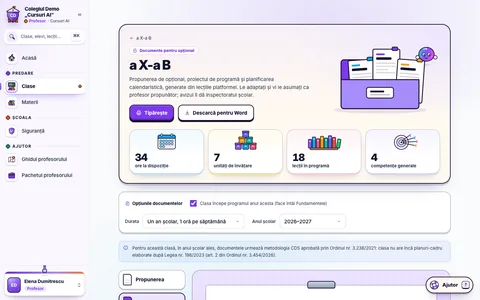
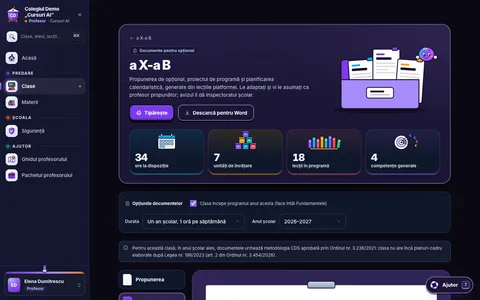
The file for the inspectorate, generated for each class
For a school elective, the teacher downloads the proposal, the syllabus, the planning and the self-check sheet based on the approval criteria, with the correlation to the official curricula. The approval is given by the county school inspectorate (ISJ); the platform does not promise it.
- Upper secondary classes that can choose it, from the 2027–2028 school year: the national elective “Artificial intelligence (AI) and digital citizenship” (OMEC no. 5.808/2026) needs no approval, and the platform’s lessons can be used as a resource.
- The teacher’s kit: the planning, printable worksheets for the whole year and the teacher’s guide.
- The school’s own subjects and lessons sit next to the AI curriculum, in Romanian or English.
Questions
Frequently asked questions
Is this the official school curriculum?
No. It is the platform’s curriculum; it does not lead to a diploma or a state-recognised certificate. For an elective, the teacher prepares the file for the county school inspectorate (ISJ) with the documents generated by the platform.
Can a class start in another year than grade 5 or 9?
Yes. A class that starts the programme in another year does the Foundations and the first nine lessons of its own year.
Can teachers change the platform’s lessons?
The platform’s lessons are not edited inside the school; teachers add their own lessons, including in the AI subject, and their own subjects.
Another question?
Call us, write to us or use the form.
See the lessons of your grades
In the demo we open the lessons, the tests and the teacher’s notes for the grades you choose.
- A demo for the management and the teachers
- One hour of online training, included
- The school creates the student accounts, in the app